Run Your Whole School
from One Place.
Admissions, learners, staff, fees, examinations, report cards and parent SMS — built for Uganda's nursery, primary and secondary curricula, so teachers can spend their time teaching.
Illustration with example data
One System. Everything Your School Needs.
Built for Uganda's nursery, primary (PLE), O-Level (new Lower Secondary Curriculum or legacy UCE) and A-Level (UACE) — with the modules a Ugandan school actually uses.
Student Admissions
Applications, admission decisions, offer letters and auto-generated student numbers. Spreadsheet import for existing learners.
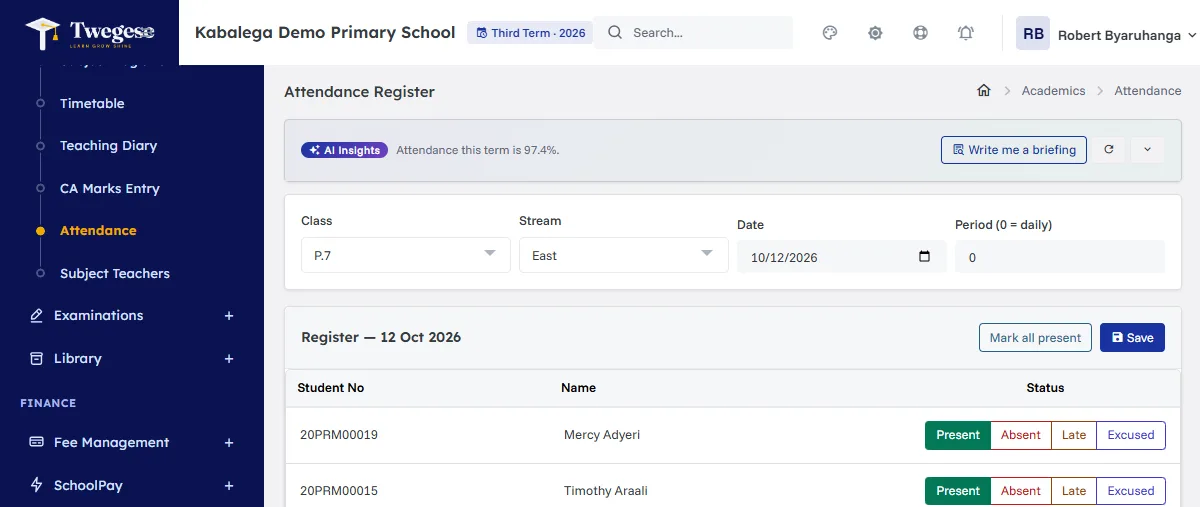
Attendance Tracking
Daily class registers on any device, attendance reports, and absence SMS to parents when you choose to send them.
Exams & Grading
Marks entry with automatic grading — PLE aggregates and divisions, O-Level A–E achievement levels or legacy UCE, and UACE points.
Report Cards
Printable PDF report cards with templates for each level, rule-based comments, and a whole class in one ZIP download.
Fees & Finance
Per-learner invoices, cash, bank, mobile money and SchoolPay payments, receipts, balances and defaulter reports.
Library Management
Book catalogue, copies, borrowing records, overdue lists and fines.
Inventory & Stores
Stock across categories — stationery, lab supplies, sports kits — with issues and reorder levels.
SMS & Parent Portal
Prepaid SMS to parents at UGX 45 per SMS — buy only what you use — and a web portal where parents see fees, published results, attendance and notices.
Roles & Security
Granular staff permissions, an audit trail of important actions, and a separate database for every school.
Analytics Dashboard
Charts for academics, finances and enrolment — pass rates, collection trends and class sizes.
Report Library
Printable academic, financial and attendance reports, filtered by term, class and date, with CSV export.
Staff Payroll
Salary structures, monthly pay runs, payslips with PAYE and NSSF deductions, and bank schedules.
From Baby Class to S.6 — Every Learner Tracked
Nursery, primary and secondary run in the same system. Each class level uses the right grading and report card for its curriculum.
- Nursery: its own report card template
- P.1–P.7: D1–F9 grades, aggregates and divisions
- S.1–S.4 Lower Secondary Curriculum: activities, A–E achievement levels and descriptors
- S.1–S.4 legacy UCE: D1–F9 grades, aggregates and divisions
- S.5–S.6: UACE combinations, principal and subsidiary subjects, and points
- Uganda subject lists ready to load for every level
- Transfers and learner status history
From Marks to Report Cards, Without the Paperwork
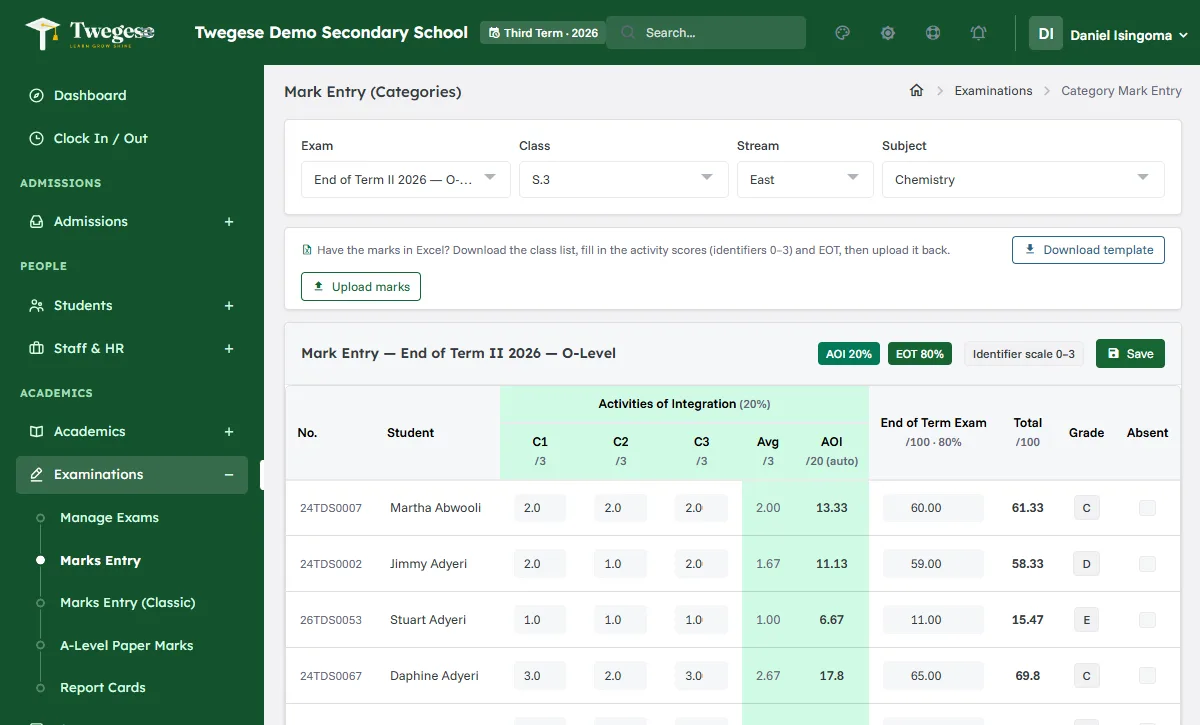
Enter marks once. Twegese works out grades, aggregates, divisions and positions, and prints report cards for every level.
- Classic marks entry or category-based entry (Activities 20% + End of Term 80%)
- Activities C1, C2, C3… on the 0–3 scale, or raw marks converted for you
- A-Level paper-by-paper marks with weighted averages
- 7 report card templates — Nursery, Primary, three O-Level, A-Level and Traditional
- Approval before publishing, a whole class as one ZIP, and report card colours you choose
Full Financial Visibility. Zero Guesswork.
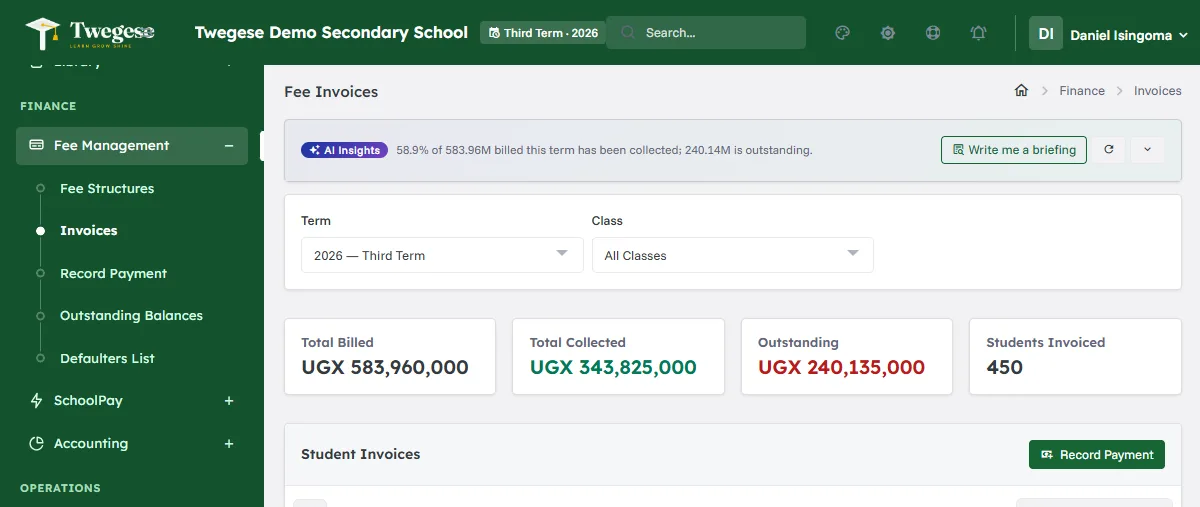
Invoice fees per class and boarding status, record every payment, and see balances update straight away.
- Per-learner invoicing from itemised fee structures
- Cash, bank, card, MTN MoMo, Airtel Money and SchoolPay payments with receipts
- Balances, arrears and part-payments tracked for every learner
- Chart of accounts, journals, vouchers and budgets
- Fee reminder SMS to parents with balances, sent when you decide
- Parents pay the school directly — Twegese never holds school fees
See Twegese at Work
Real screens from a demo school. Pick a screen to look closer.
The term at a glance
- Learners, staff, fee balances and attendance on one screen
- The current term and days remaining
- Fee collection and enrolment charts

From application to enrolled learner
- Applications with the applicant's and guardian's details
- Approve, waitlist or reject, and print an offer letter
- Import existing learners and staff from a spreadsheet

Know who has paid, and who has not
- Fee structures per class and term, then invoices in one step
- Totals billed, collected and outstanding
- Balances per learner, with receipts for every payment
Marks entry built for the new curriculum
- Activities of Integration on the 0–3 scale, or raw marks converted for you
- Average, AOI out of 20, exam out of 80 and total worked out as you type
- Teachers only see the classes and subjects they teach
Check, approve, then publish
- Each exam moves through marks entered, approved, computed and published
- Positions, aggregates and divisions from your grading settings
- Parents see results only after you publish them

Report cards ready to print
- Templates for Nursery, Primary, O-Level (new curriculum and legacy UCE) and A-Level
- Class-teacher and head-teacher comments suggested from rules you set
- PDF for one learner, or the whole class as a ZIP

Daily registers in a few taps
- Present, absent, late or excused for each learner
- Mark the whole class present, then change the exceptions
- Send absence messages to parents when you choose to
Reach parents by SMS
- Send to everyone, all staff, all parents or the parents of one class
- Fee reminders to parents with balances, sent when you decide
- A log of every message and whether it was sent

Screenshots show a demo school with fictional learners and staff.
How an O-Level Subject Is Graded
Enter activity scores and an exam mark to see the total, grade and achievement level under the Lower Secondary Curriculum.
How Schools Get Started
No installation and no IT department — just a web browser and your school's information.
We Set Up Your School
A step-by-step set-up covers your school's details, classes, curriculum, terms, fees and payment settings.
Import Your Data
Upload existing learners and staff from a spreadsheet, assign classes and link parent contacts. Each staff member gets their own account and role.
Go Live
Take attendance, enter marks, generate invoices, print report cards, and invite parents to the portal.
Transparent Pricing. No Surprises.
All prices in Uganda Shillings (UGX), billed per term. SMS to parents are prepaid separately at UGX 45 per SMS — pay only for what you send. New schools pay a one-time installation & setup fee of UGX 350,000.
Starter
For schools up to 300 learners
≈ UGX 500 per learner at 300 learners
- Learner and staff records
- Admissions and attendance
- Exams, marks and report cards
- Fee invoicing and payment records
- 2 GB storage
Standard
For schools up to 800 learners
≈ UGX 438 per learner at 800 learners
- Everything in Starter
- Parent portal
- Library (loans and overdue fines)
- Inventory and stores
- Finance and accounting
- 10 GB storage
Premium
For schools up to 2,000 learners
≈ UGX 375 per learner at 2,000 learners
- Everything in Standard
- Priority support
- 50 GB storage
Enterprise
For larger schools and school groups
Quoted for your school
- Everything in Premium
- Student and storage limits agreed in your contract
- Custom development, quoted separately
One-time installation & setup
Paid once, when your school joins. Never charged again.
- Data migration support — we help move your learners, parents, staff, fee balances and past results from your current system or Excel sheets.
- School setup — classes and streams, subjects and combinations, fee structures, grading and report cards set up for your school.
- Staff training — the head teacher, DOS, bursar, teachers and other staff are shown how to use the parts of Twegese they work with.
Your first invoice is the plan for the term plus the setup fee; from the second term you pay the plan only.
Fees are invoiced per term in advance, and the one-time setup fee with the first term; any taxes that apply are shown on the invoice. See our Refund Policy and Terms and Conditions.
Questions Schools Ask
Bring Your School Onto Twegese.
Request a Demo.
Tell us about your school and how to reach you. We will contact you to arrange a demo — we only use these details to reply.
- [email protected]
- Bitosoft Innovations Hub Co. Ltd, Masindi, Uganda